ConnexCS Centralized Authentication and Account Management
Overview
ConnexCS uses a centralized authentication service to manage authentication and account access across its applications and portals.
Authentication is handled through this service before you are redirected back to the application you originally requested.
When you access a ConnexCS application, such as app.connexcs.com, you may be redirected to:
auth.connexcs.com
In addition to handling authentication, auth.connexcs.com provides an account management interface where you can view and manage authentication-related settings.
The account page includes the following tabs:
- Profile
- Passkeys
- Active Sessions
- Connected Apps
- API Tokens
Authentication Flow
When you access a ConnexCS application, the general authentication flow is:
+----------------------------+
|            User            |
|   Opens ConnexCS Portal    |
+--------------+-------------+
               |
               v  (authentication required)
+----------------------------+
|     ConnexCS Application    |
|      app.connexcs.com       |
+--------------+-------------+
               |
               v  (redirect)
+----------------------------+
|      auth.connexcs.com      |
|   Central Authentication    |
|           Service           |
+--------------+-------------+
               |
               v  (user authenticates)
+----------------------------+
|        Authentication       |
|          Successful         |
+--------------+-------------+
               |
               v  (redirect back)
+----------------------------+
|     ConnexCS Application    |
|        Access Granted       |
+----------------------------+
The authentication service provides the centralized identity and authentication layer, while the ConnexCS application provides the actual service or functionality.
What Is auth.connexcs.com?
auth.connexcs.com is the ConnexCS authentication service.
It is responsible for handling the authentication portion of the login process and should not be confused with the individual ConnexCS applications themselves.
| Domain | Purpose |
|---|---|
auth.connexcs.com |
Central authentication service |
app.connexcs.com |
ConnexCS application |
| Other ConnexCS portals | Individual ConnexCS services or applications |
The application provides the service, while
auth.connexcs.comhandles centralized authentication.
Why Does ConnexCS Use auth.connexcs.com?
Centralizing authentication allows ConnexCS to manage authentication consistently across its applications, instead of each application independently handling the complete login process.
- Centralized Authentication — Authentication is handled through a common ConnexCS authentication service.
- Consistent Security — Security controls and authentication policies can be applied consistently across ConnexCS applications.
- Single Sign-On — Where supported, customers can authenticate once and access multiple authorized ConnexCS applications without repeatedly entering their credentials.
- Centralized Session Management — Authentication sessions can be managed through the central authentication service rather than independently by every application.
- Easier Application Integration — New ConnexCS applications can use the centralized authentication mechanism instead of implementing a separate authentication system.
What Happens When I Log In Again?
If you already have a valid authentication session, you may not be required to enter your credentials again when accessing another ConnexCS application that uses the same centralized authentication service.
The authentication service can recognize your existing session and allow the application to continue the login process. The exact behavior may depend on the application and the authentication session state.
Is This a Separate ConnexCS Account?
No. auth.connexcs.com is part of the ConnexCS authentication architecture.
You continue to use your existing ConnexCS account and credentials. The redirect does not mean that you are being asked to create a separate account.
Account Management
After signing in, auth.connexcs.com provides an account management page where you can manage different aspects of your authentication and account access.
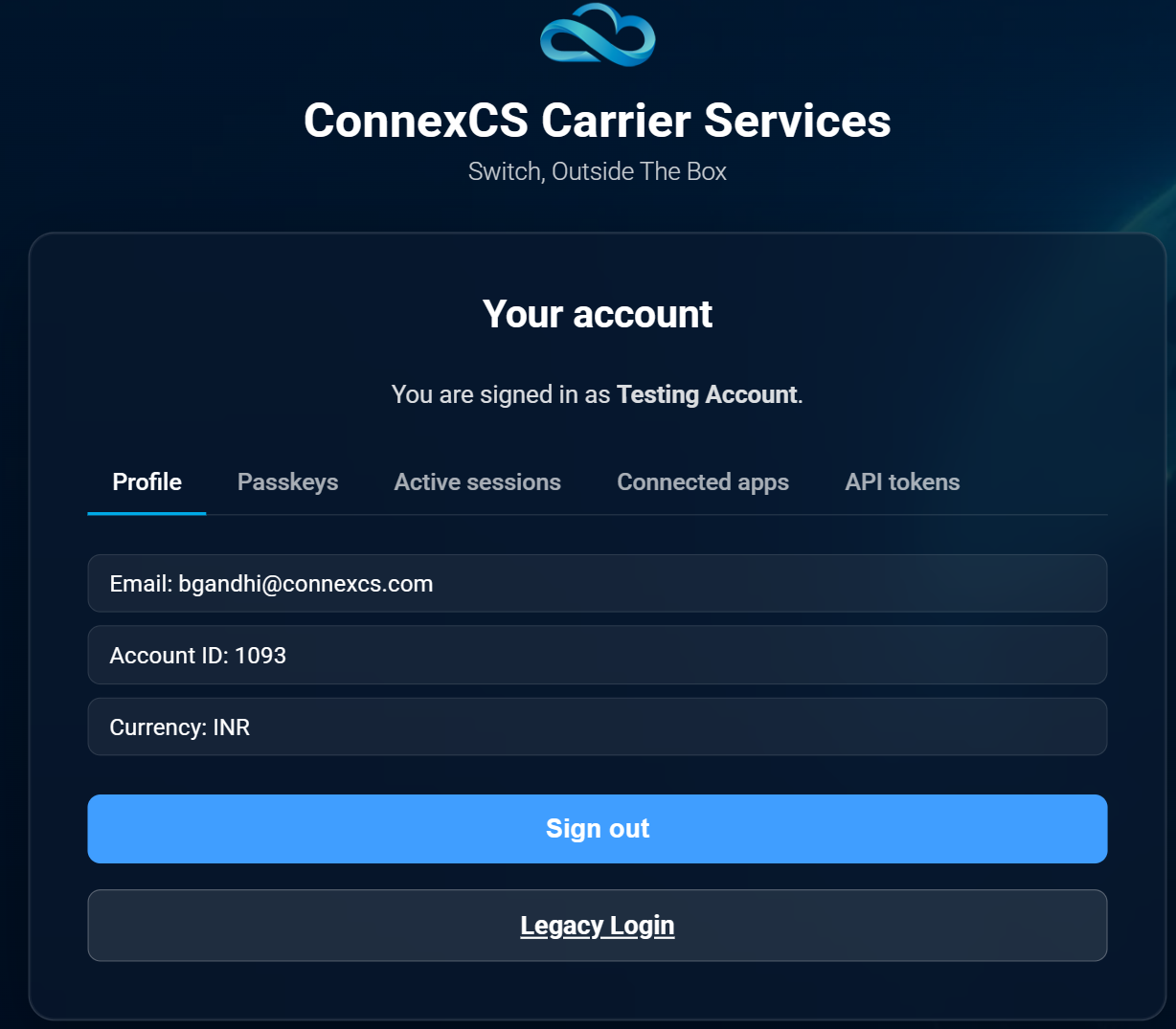
1. Profile
The Profile tab displays basic information associated with your ConnexCS account, which can include:
- Email — The email address associated with your account.
- Account ID — Your ConnexCS account identifier.
- Currency — The currency configured for your account.
The Profile tab also provides the Sign out option.
Sign out
Click Sign out to end your current authenticated session. If you are signed in on multiple devices or browsers, signing out of the current session does not necessarily sign you out of every other active session. Other sessions can be managed from the Active Sessions tab.
2. Passkeys
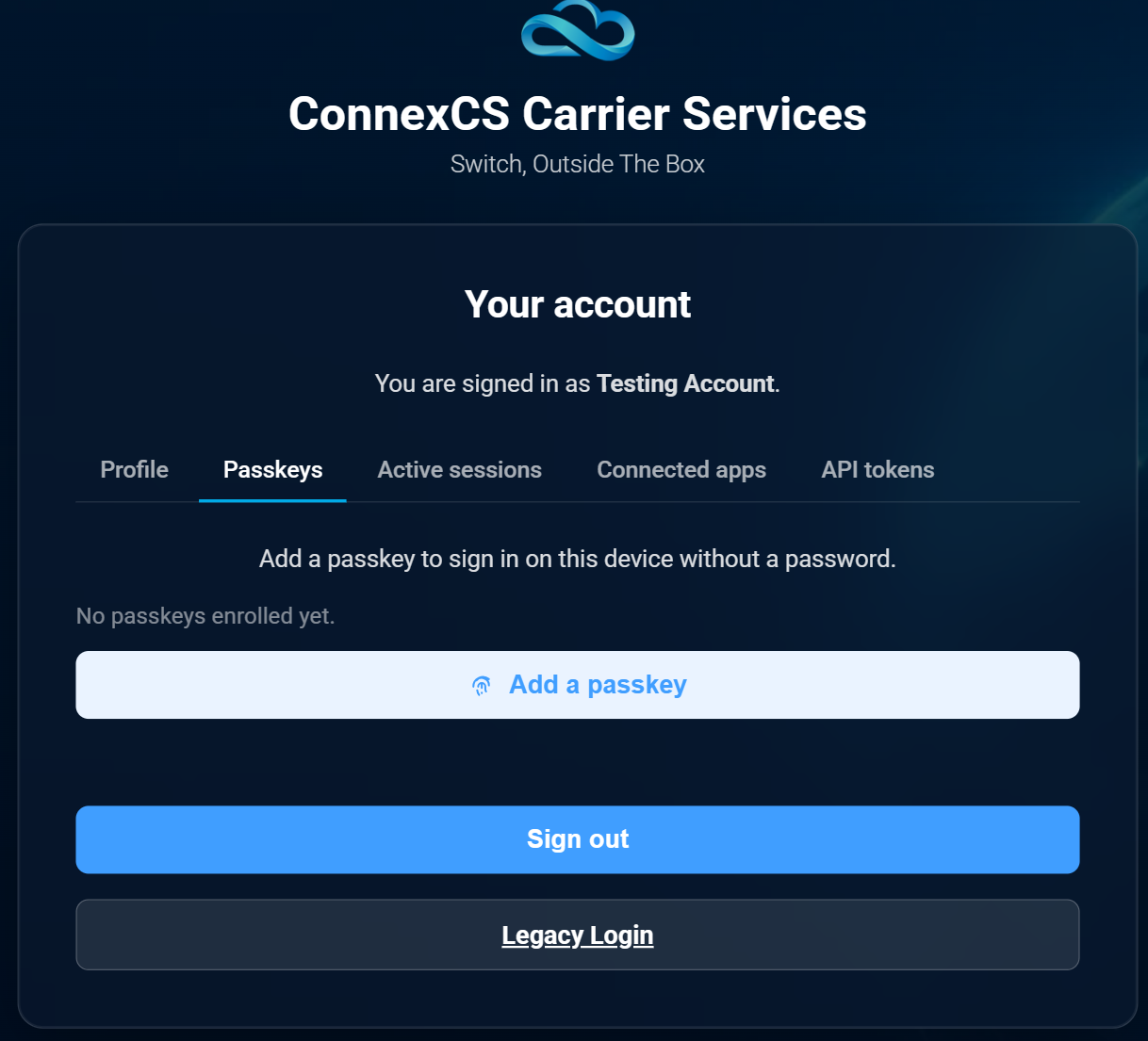
The Passkeys tab allows you to manage passkeys associated with your ConnexCS account.
A passkey allows you to authenticate without entering a traditional password.
Depending on the device and platform, a passkey may use a biometric method, device PIN, security key, or another supported authentication mechanism.
If no passkeys have been registered, the page displays:
No passkeys enrolled yet.
Add a passkey
Click Add a passkey to register a passkey for your account. Once registered, the passkey can be used as an authentication method on supported devices and browsers.
Why use a passkey?
Passkeys provide a passwordless authentication method and can help improve account security by using credentials protected by the user's device.
3. Active Sessions
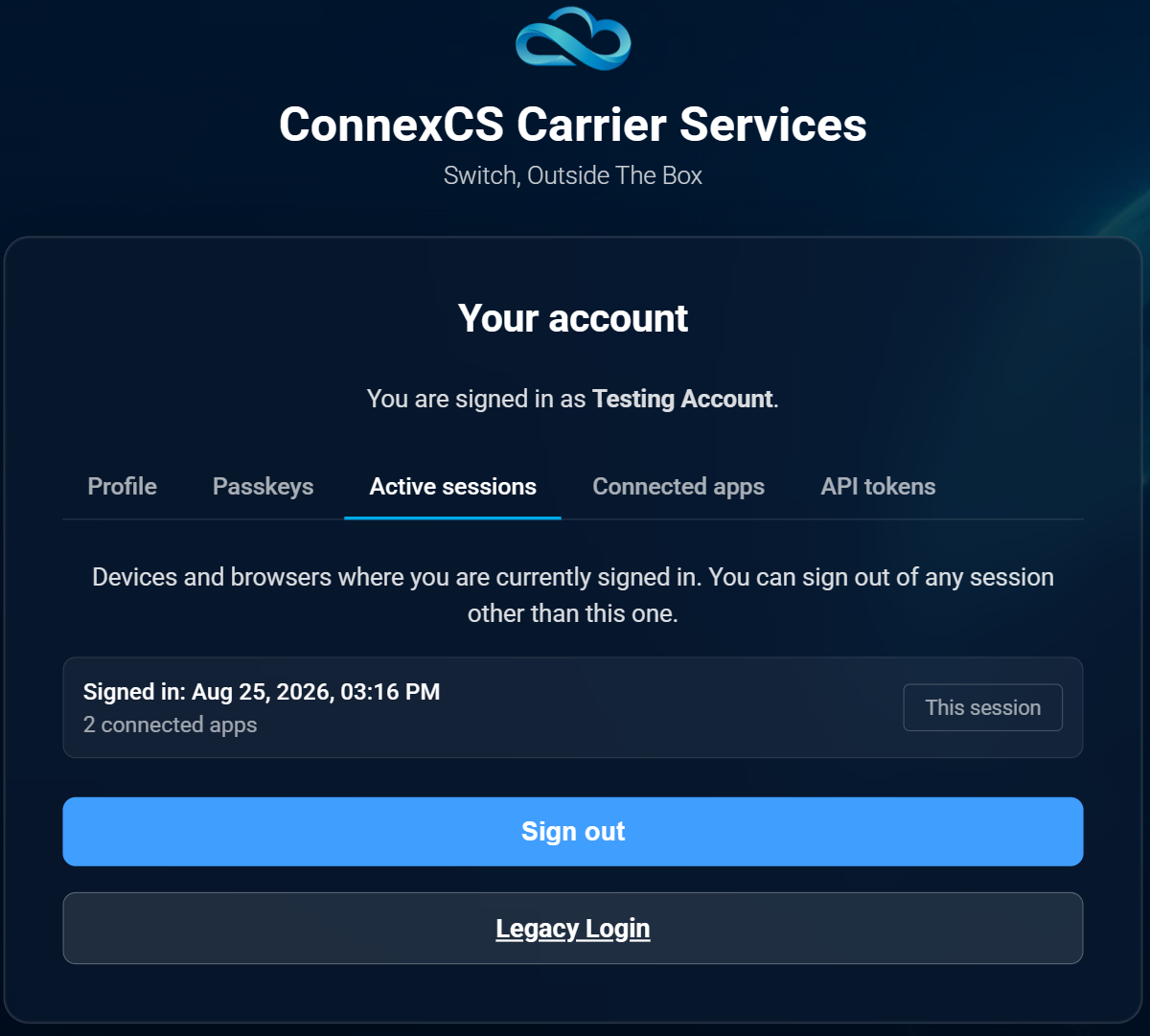
The Active Sessions tab shows the devices and browsers where your ConnexCS account is currently signed in, allowing you to review and manage active authentication sessions.
The page displays information such as:
- Session sign-in date and time
- Connected applications associated with the session
- Whether the session is the current session
Signed in: Aug 25, 2026, 03:16 PM
2 connected apps
This session
Managing sessions
You can sign out of sessions other than the current session. This is useful if:
- You are no longer using a device.
- You signed in from a shared or temporary computer.
- You suspect that your account is still signed in on another device.
- You want to terminate an older session.
Current session
The current browser session is identified as This session — indicating the session you are currently using to access the account management page.
4. Connected Apps
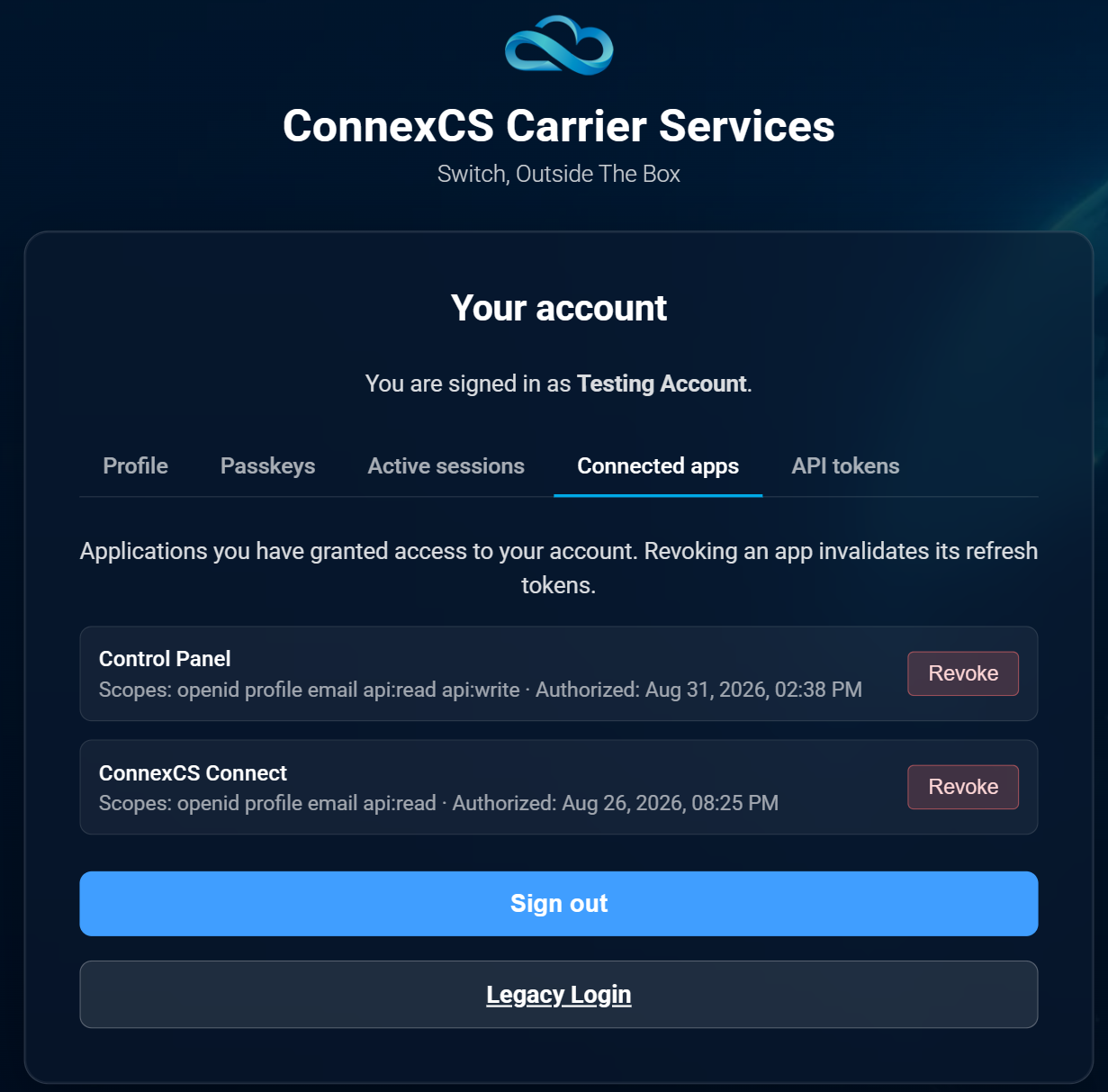
The Connected Apps tab displays applications that have been authorized to access your ConnexCS account, providing visibility into which applications have access and what permissions have been granted.
Each connected application can display:
- Application name
- Scopes — The permissions granted to the application.
- Authorization date and time
- Revoke option
Control Panel

Scopes:
openid profile email api:read api:write

Authorized:
Aug 31, 2026, 02:38 PM
ConnexCS Connect

Scopes:
openid profile email api:read

Authorized:
Aug 26, 2026, 08:25 PM
What are scopes?
Scopes define what an authorized application is permitted to access or perform on behalf of your account.
| Scope | Purpose |
|---|---|
openid |
Identifies the authentication request as an OpenID Connect authentication flow |
profile |
Allows access to permitted profile information |
email |
Allows access to the account email information |
api:read |
Allows permitted API read operations |
api:write |
Allows permitted API write operations |
The actual access available to an application depends on the scopes granted to it.
Revoking an application
Click Revoke to remove an application's authorization. Revoking an application invalidates its associated refresh tokens, preventing the application from continuing to obtain new access tokens through that authorization.
Important: Revoking an application is different from signing out of a browser session. Connected Apps controls application authorization, while Active Sessions controls signed-in sessions.
5. API Tokens
The API Tokens tab is intended for long-lived authentication credentials used by scripts and integrations. These tokens are designed for programmatic access rather than interactive browser login.
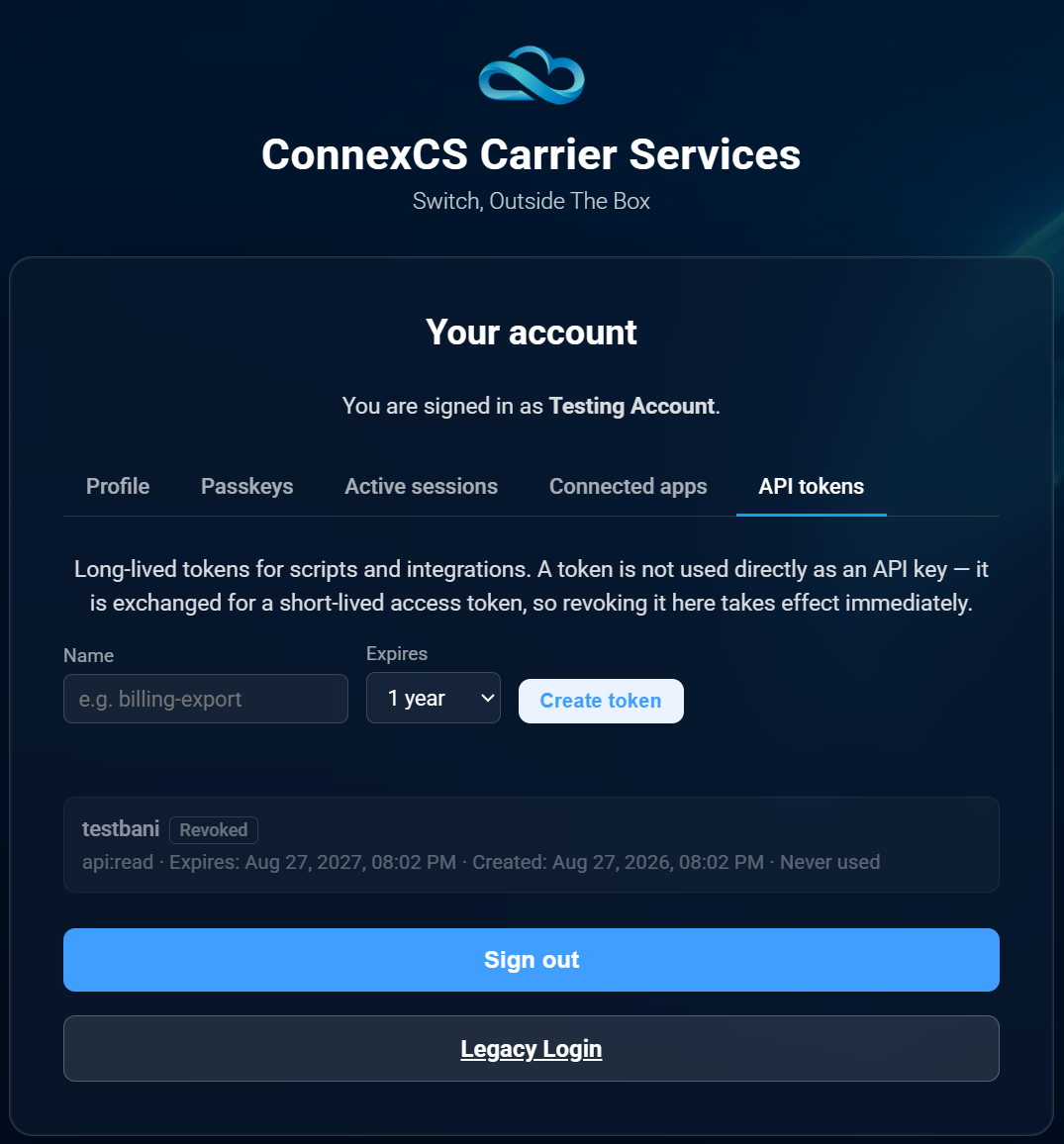
Long-lived tokens for scripts and integrations.
Creating an API token
- Enter a Name for the token — for example,
billing-export. - Select an expiration period from Expires.
- Click Create token.
The token will then appear in the API Tokens list.
Token information
An API token entry can display:
- Token name
- Token status
- Scopes
- Expiration date and time
- Creation date and time
- Usage status
billing-export

api:read

Expires: Aug 27, 2027, 08:02 PM
Created: Aug 27, 2026, 08:02 PM
Never used
API token vs API access token
An API token is not used directly as an API access token. The long-lived token is exchanged for a short-lived access token, which is then used to make API requests. This separation helps reduce the exposure period of the credential used for individual API requests.
Revoking an API token
If an API token is no longer required, it should be revoked. Revoking the token prevents it from being used to obtain new access tokens. The interface can show a revoked token with a status such as Revoked.
Understanding the Difference Between Sessions, Connected Apps, and API Tokens
These three sections serve different purposes:
| Feature | Purpose |
|---|---|
| Active Sessions | Manages browser/device sessions where the user is signed in |
| Connected Apps | Manages applications authorized to access the account |
| API Tokens | Manages long-lived credentials used by scripts and integrations |
For example:
- You lose your laptop → Review Active Sessions and sign out the relevant session.
- You no longer want an application to access your account → Go to Connected Apps and click Revoke.
- You no longer use an integration or script → Go to API Tokens and revoke its token.
Legacy Login
The account page also provides a Legacy Login option. This provides access to the previous/legacy ConnexCS login mechanism where required.
Customers should use the standard centralized authentication flow unless they specifically need the legacy login option for a supported legacy workflow.
Note: Legacy Login is separate from the new centralized authentication experience.
Sign Out
The Sign out button is available across the account management interface. Selecting Sign out ends the current authenticated session.
It does not necessarily:
- Revoke connected applications.
- Revoke API tokens.
- Remove passkeys.
- Sign out other active sessions.
These actions are managed separately through their respective tabs.
Authentication Account Management at a Glance
                        auth.connexcs.com
                                |
                       Account Management
                                |
   -------------+-----------+-----------+-----------+------------
   |             |           |           |            |
Profile       Passkeys   Active       Connected     API Tokens
                          Sessions        Apps
   |             |           |           |            |
Account       Password-   Browser /    Authorized    Scripts &
details       less login  device       applications  integrations
                          sessions
Security Considerations and Recommendations
Customers should always verify that the authentication page is hosted on an official ConnexCS domain before entering credentials.
During the authentication process, the browser may display auth.connexcs.com — this is the expected ConnexCS authentication domain.
Customers should be cautious of domains that imitate ConnexCS or use similarly spelled domain names.
If you encounter an unexpected authentication page or have concerns about the authenticity of a login page, do not enter your credentials and contact ConnexCS Support.
We recommend:
- Use a strong and unique password where passwords are required.
- Enable a passkey where supported.
- Review Active Sessions periodically.
- Sign out sessions associated with devices you no longer use.
- Review Connected Apps and revoke applications that are no longer required.
- Use API tokens only for legitimate scripts and integrations.
- Give integrations only the permissions they require.
- Revoke API tokens that are no longer required.
- Use appropriate expiration periods for API tokens.
- Never share passwords, passkeys, or API tokens with other users.
Frequently Asked Questions
Why am I redirected to auth.connexcs.com when I log in?
ConnexCS uses auth.connexcs.com as its centralized authentication service. Applications redirect users there when authentication is required.
Is auth.connexcs.com a separate ConnexCS application?
It is the centralized authentication service used by ConnexCS applications. The application you are accessing remains on its respective ConnexCS domain.
What can I manage from the account page?
You can manage or review your Profile, Passkeys, Active Sessions, Connected Apps, and API Tokens.
What is the difference between a Connected App and an API Token?
A Connected App is an application that has been authorized to access your account. An API Token is a long-lived credential intended for scripts and integrations.
Does signing out revoke my API tokens?
No. Signing out ends the current browser session. API tokens must be managed separately from the API Tokens tab.
Does signing out remove Connected Apps?
No. Connected application authorizations are managed separately from the Connected Apps tab.
Can I sign out another device?
Yes. The Active Sessions tab allows you to sign out of other active sessions.
What happens when I revoke a Connected App?
The application's authorization is removed and its associated refresh tokens are invalidated.
What happens when I revoke an API token?
The token can no longer be used to obtain new access tokens for API access.
Summary
ConnexCS centralizes authentication through auth.connexcs.com to provide a consistent authentication experience across ConnexCS applications.
The general flow is:
ConnexCS Application → auth.connexcs.com → Authentication → ConnexCS Application
The centralized account interface provides customers with visibility and control over their authentication and access:
| Tab | Manage |
|---|---|
| Profile | Account information |
| Passkeys | Passwordless authentication methods |
| Active Sessions | Signed-in browsers and devices |
| Connected Apps | Authorized applications and their scopes |
| API Tokens | Long-lived credentials for scripts and integrations |
Sessions control where you are signed in, Connected Apps control which applications are authorized, and API Tokens control programmatic access for integrations.
This gives customers greater visibility and control over how their ConnexCS account is accessed.